RODOGRAU Your First Wheelie Awaits
Learn the basics of RODOGRAU 2.0 and start mastering the art of Grau.
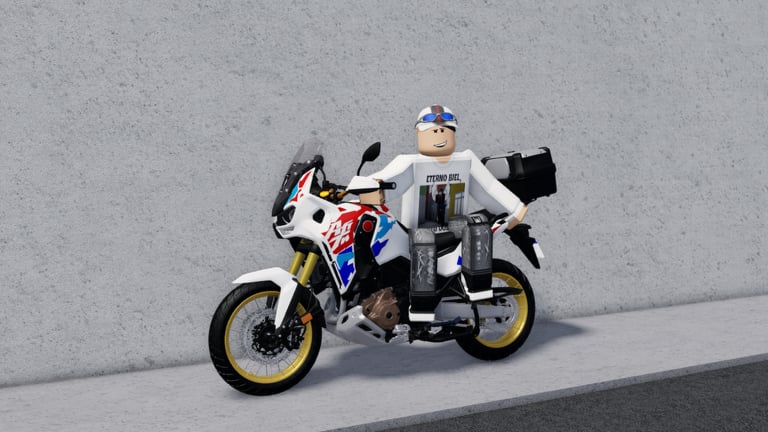
Welcome to RODOGRAU 2.0, the ultimate Roblox motorcycle simulator inspired by Brazilian “Grau” culture. This guide will walk you through everything you need to know to get started, from basic controls to executing your first wheelie. By the end, you’ll be ready to explore the city and practice your skills.
What is RODOGRAU?
RODOGRAU is a free-to-play Roblox experience that simulates the exciting world of Brazilian motorcycle stunt culture. “Grau” refers to the art of performing wheelies on motorcycles, and the game captures this culture in a vibrant open-world environment. Players spawn motorcycles, explore a detailed Brazilian city, customize their riders, and practice various wheelie techniques.
The game has achieved tens of millions of visits and maintains an active community of thousands of players. Regular updates add new motorcycles, map improvements, and features. The community is welcoming to new players who want to learn the ropes and practice their skills.
Basic Controls
Understanding the control scheme is essential before you start riding. RODOGRAU uses a combination of keyboard controls for movement and chat commands for features.
Movement Controls
The primary movement controls are straightforward and follow standard gaming conventions:
- W — Accelerate your motorcycle
- S — Brake or reverse
- A / D — Turn left and right respectively
- T — Perform a wheelie (Grau) — only works when the bike is moving
These four controls form the core of RODOGRAU gameplay. Master these before moving on to more advanced techniques.
Transmission and Additional Controls
Beyond the basics, several additional controls enhance your gameplay:
- M — Toggle between automatic and manual transmission
- E / Q — Shift gears up and down (manual mode only)
- L — Toggle headlights on and off
- X — Activate turn signals
The automatic transmission is recommended for beginners as it handles gear shifting automatically. Manual mode offers more control for experienced players who want to fine-tune their riding.
Spawning Your First Motorcycle
When you first enter RODOGRAU, you’ll need to spawn a motorcycle before you can ride. The spawn menu provides access to all available motorcycles in the game, ranging from basic commuter bikes to high-performance sport machines.
Look for the spawn menu in the game interface. The exact location varies depending on the current update, but it’s typically accessible through a menu button or by approaching a motorcycle dealership in the city. Browse through the available options and select one that appeals to you.
Some motorcycles require Robux to unlock through gamepasses, but many excellent free options are available. Start with a free motorcycle and upgrade as you become more comfortable with the game.
Your First Wheelie
Performing a wheelie is the heart of RODOGRAU gameplay. Here’s how to execute your first one:
- Get Moving — Press W to accelerate. You need forward momentum before attempting a wheelie.
- Build Speed — Once moving, continue accelerating to a comfortable speed. Too slow and the wheelie won’t work; too fast makes control difficult.
- Press T — At your target speed, press T to lift the front wheel. Timing is everything.
- Control the Balance — Use A and D to adjust your balance during the wheelie. This takes practice.
- Release Gradually — Let off the wheelie command slowly to bring the front wheel down safely.
Don’t be discouraged if your first attempts don’t go perfectly. Wheelies require practice, and every experienced rider was once a beginner. Find a quiet area of the map to practice without worrying about traffic or other players.
The Brazilian City Map
RODOGRAU features an expansive open-world city inspired by Brazilian urban environments. The map includes various neighborhoods, highways, and landmarks that you can explore during gameplay.
Key Areas
The city features several distinct areas that offer different experiences. The downtown area provides busy streets and traffic to navigate, while residential neighborhoods offer quieter streets ideal for practice. Highways connect different parts of the map and are perfect for high-speed riding and extended wheelies.
Notable locations include Brazilândia, which is known for its challenging terrain, and areas toward Igaratá and the beach that offer scenic routes for relaxed exploration. Each area has its own character and provides different opportunities for gameplay.
Finding Good Practice Spots
When learning wheelies, look for wide, flat areas with minimal traffic. Empty parking lots, quiet side streets, and unused portions of the highway are ideal. As you improve, you can practice in more challenging environments with traffic and obstacles.
Customizing Your Rider
RODOGRAU offers extensive customization options for your character. The chat command system provides access to various helmets and accessories.
Helmet Commands
Type these commands in the chat to equip different helmets:
- /cap1 through /cap23 — Equip different helmet styles
- /rh — Remove helmet and accessories
Experiment with different helmets to find your style. Some players prefer classic motorcycle helmets while others opt for more distinctive designs.
Character Skins
To copy another player’s appearance, use the command /char followed by their username. This lets you try different character combinations that you see other players using.
Essential Chat Commands
Beyond helmets, several other commands enhance your experience:
- /char [username] — Copy another player’s skin
- /fps — Optimize performance if experiencing lag
- /bag or /bag2 — Equip a delivery backpack
- /ofc — Access portable workshop (requires gamepass)
These commands form the foundation of RODOGRAU’s feature system. Familiarize yourself with them to get the most out of the game.
Tips for New Players
Start Slow
Don’t rush into complex maneuvers before mastering the basics. Spend time getting comfortable with the controls and executing basic wheelies before attempting more advanced techniques.
Join the Community
The RODOGRAU community is active and welcoming. Join the official O Recomeço RDG group to stay updated on new features and connect with other players. Watching YouTube videos from content creators also provides valuable tips and demonstrates advanced techniques.
Explore the Map
Take time to explore the entire map. Understanding the layout helps you find the best spots for different activities and makes navigation easier during gameplay.
Practice Regularly
Like any skill, wheelie mastery comes with practice. Set aside time to focus on improvement, and don’t get frustrated by initial setbacks. Every expert started exactly where you are now.
Next Steps
Once you’re comfortable with the basics, explore these related guides:
- Controls Guide — Full keyboard, mobile, and chat shortcut reference
- Advanced Grau — Longer holds, higher wheelies, cleaner landings
- Montadinha Guide — Passenger riding, poses, and duo etiquette
- Codes & Commands — Master the full command system
- Tier List — Find the best motorcycles for your style
- Guides Hub — Explore all available walkthroughs
Remember, everyone starts as a beginner. The key is patience and consistent practice. Before you know it, you’ll be executing impressive wheelies and exploring the city like a pro.
Frequently Asked Questions
Quick answers to the most common questions about RODOGRAU.
What are the basic controls in RODOGRAU?
W accelerates, S brakes, A/D turn, and T performs a wheelie when moving. Additional controls include M for transmission, L for headlights, and X for turn signals.
How do I perform my first wheelie?
Build speed with W, then press T to lift the front wheel. Use A/D to balance, and release gradually to bring the wheel down safely. Practice in quiet areas first.
Are there free motorcycles available?
Yes, many motorcycles are free to spawn. Premium and exclusive bikes require Robux purchases through gamepasses, but free options provide excellent gameplay.
How do I customize my character's helmet?
Use chat commands /cap1 through /cap23 to equip different helmets. The command /rh removes your current helmet. Experiment to find your favorite.
What happens if I crash during a wheelie?
Your character will dismount and the motorcycle will fall. Simply respawn or retrieve your bike and try again. Crashes are part of learning, so don't get discouraged.
Can I play RODOGRAU on mobile?
Yes, RODOGRAU supports mobile devices with touch controls. The game adapts the control scheme for smaller screens, allowing you to accelerate, brake, steer, and perform wheelies using on-screen buttons.